Examples
DVIR APIs
Latest updates:
Severity level for Defect in DVIRs
- “Unregulated” Defects are defects that are not included in the Electronic Code of Federal Regulations §396.11. For example, paint scratches on the door or the radio button malfunction.
- “Unregulated” Defect will be carried over to the next DVIR if it's not been repaired in the previous DVIR.
Create DVIR without repairing all defects on the pervious DVIR
- DVIR can be certified with outstanding defects. It will remain on that device until this Defect has been repaired. And new DVIR can be created after the previous log has been certified.
Allow repairing of individual defects
- Defect now can be repaired individually with the new DVIRDefect object. A DVIRLog has a list of DVIRDefect objects which contains information such as repairDate, repairUser and repairStatus.
- Each DVIRDefect can have three states: Not Repaired, Repaired, Not Necessary
Allow adding multiple remarks to defects
- Each DVIRDefect has a list of DefectRemark which has information about the date and the user who made this remark and the remark itself.
Rules about creating a new DVIRLog
When creating a new DVIRLog for an existing device, we must first look up its previous DVIRLog. If the previous DVIRLog on this device has not been repaired, we may need to first repair the outstanding defects. Some defects can be carried forward from one inspection to another, depending on jurisdiction.
Example
Here are some API runner examples on how to interact with the new DVIR objects, note that the deviceId, defectId, userId and so on will be different depending on which database you are using. The properties which are in bold, are the key requirements.
Workflow for create a new DVIRLog with no previous DVIRLog on the same Device
Create a new DVIRLog
Pull the DVIRLog we just added
Repair the DVIRDefect inside the DVIRLog
How to add a remark
How to update the remark
How to certify the DVIRLog
Workflow for create a new DVIRLog with previous DVIRLog on the same Device
Need to pull previous DVIR on this device.
Create a new DVIRLog with a carryover defect from previous log and additional defects
defectList and Defect in DVIRLog
Below is a typical example of a DVIRLog object:
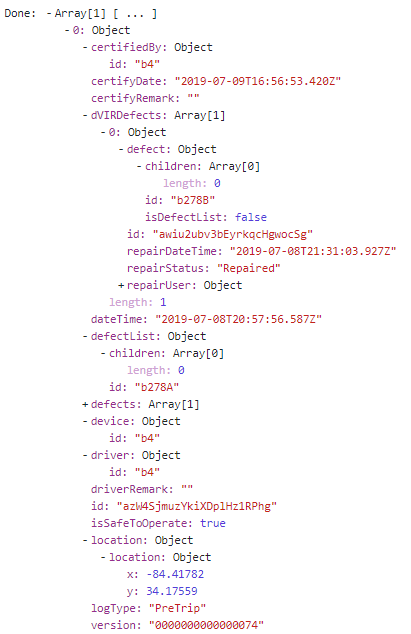
Most of the object inside DVIRLog are minified, but you can use the id provided to get the full object.
In the above example, defectList has an id with value “b278A”, we can use this id to get the full defectList which used to create this DVIRLog.
Now we have the entire defectList which contains Parts and the Defect under each Part

If we expand the children property in this defectList we will have a list of Parts with their name, id and other properties.
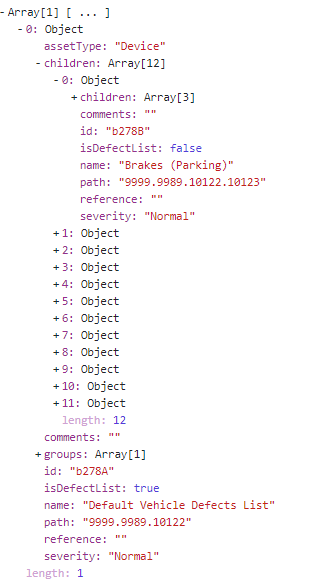
If we expand even further into Parts, we can find a list of Defect objects under each Part with their own id. In the example below the Part is “Brakes (Parking)” with id “b278B”, and the Defect under that Parts is “slow to release” with id “b278C”
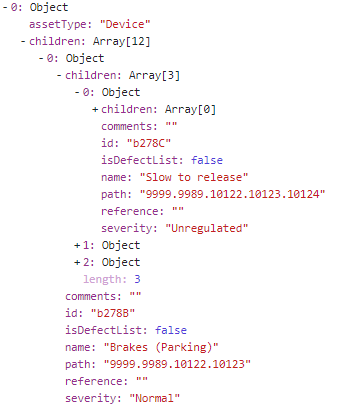
This Defect id “b278C” is also the Defect id we use inside the DVIRDefect object

So the best way to understand the meaning of each Defect in DVIRDefect is to first retrieve the defectList used to create the DVIRLog, and then look up the Defect id in this list to understand which Part the Defect belongs to.
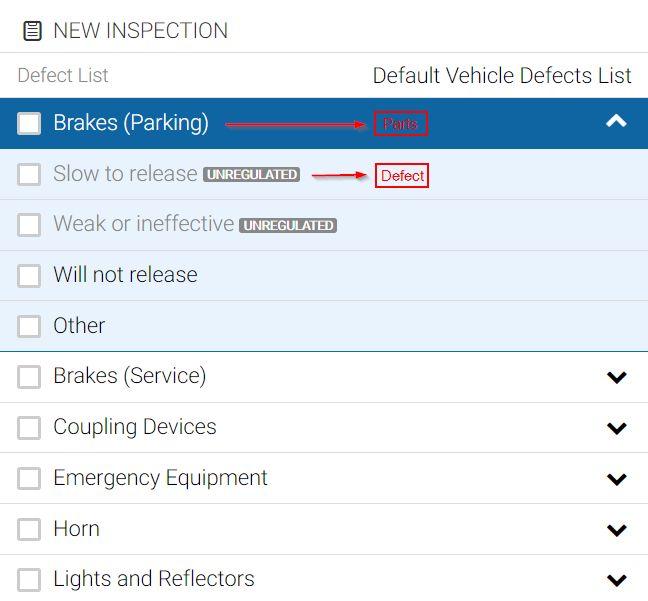
The number of Defects under each Part are finite so if a user couldn't find the appropriate Defect inside one Part, they can choose “Other” as the Defect (this can be disabled for the defect list in MyGeotab)
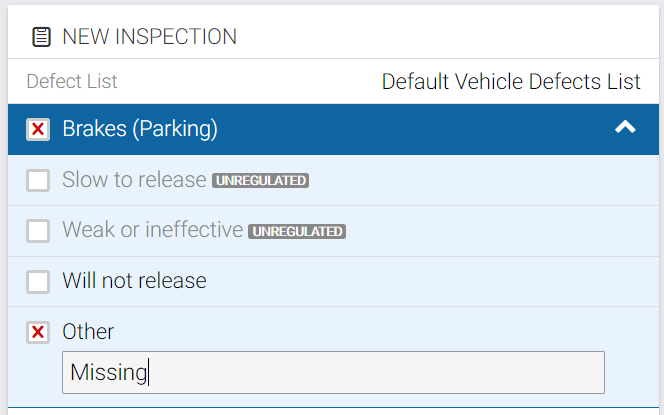
When a user chooses “Other”, we use the Parts id to represent the Defect.

Note that the Defect id “b278B” in the DVIRLog on the left is the id for the Part “Brakes (Parking)”, not a Defect id under this Part such as “b278C” which is “slow to release”
Note:
If “Other” defect is selected, it is required to add a remark to describe the defect. So DVIRDefect with Defect id being a Part id requires at least one DefectRemark.