Data Feed
The data feed is the primary method used to synchronize data from the telematics system to another system using the API. The GetFeed method can be polled at intervals to get new and updated data from the system. The feed API works with a token that is passed on every request and sent back with the payload on every response. This allows Geotab to track"up to which point in time" we have already sent the receiver data. It also allows the receiver to stop and seamlessly resume the data feed.
Lightweight incremental poll
The feed API is designed to be lightweight and scalable. There is virtually no cost on Geotab's side for a poll request that yields no data. For example, a poll request when the round trip has no GPS coordinates will return no payload data. The requests themselves, the amount of processing time taken, and the amount of data returned via the internet are all extremely small.
Here is a small trace showing < 100 bytes for an empty poll request with a response time of 19ms. The last request contains a payload with 2 GPS coordinates.
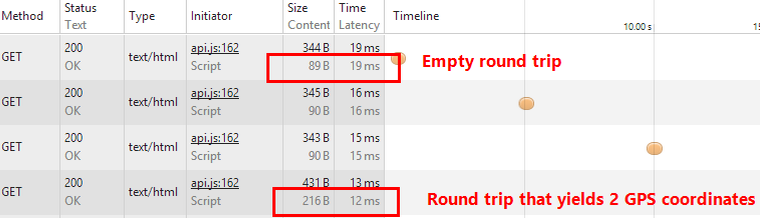
The polling frequency should be adaptive based on the volume of data returned. When a response contains the maximum number of records, call GetFeed again immediately because there is more data waiting. When fewer records are returned, wait a short interval before the next call. When no records are returned, progressively increase the wait interval until new data appears, then reset to the short baseline. This approach avoids wasting requests during idle periods while ensuring low latency during high-volume periods.
How the version token works
GetFeed uses a version-based token system to track your position in the data stream. Each GetFeed response includes a toVersion token. Pass this value back as fromVersion in your next call to receive only the records that have changed since then. The server does not track your position. It is your responsibility to persist and reuse the toVersion after successfully processing each response.
The version token is a sequential counter shared across all records of a given entity type. It is not per-user or per-device.
On the very first call, you have three options for where to start in the data stream:
- Start from now: Omit
fromVersion(or passnull). The response returns an empty data set and atoVersionrepresenting the current position. Use this when you only want data going forward.
- Start from the beginning: Pass
fromVersion: "0"to receive data from the earliest available records. Use this when you need a full historical backfill.
- Start from a specific date: Pass a
fromDateinside thesearchobject exactly once, on the very first call only, to obtain atoVersionanchored to that point in time. After durably processing the response, persist thetoVersionand never usefromDateagain because converting dates to versions is computationally expensive and should not be repeated on every program restart.
Regardless of which option you choose on the first call, all subsequent calls follow the same pattern: pass the last saved toVersion as fromVersion:
Process each batch with durable, idempotent operations, then save its toVersion. If the process fails before the checkpoint is saved, the batch can be replayed safely. Saving the checkpoint first can skip records permanently when processing fails. If you lose your token, you will need to restart the feed from scratch or use fromDate once as a last resort to recover a starting position.
Service account configuration
The account configured to perform GetFeed calls should follow all service account recommendations and should only be a member of the system CompanyGroup (the root group).
GetFeed is designed for full-scope, machine-to-machine data synchronization. When the API user does not have Company Group access, GetFeed queries run significantly slower and may trigger the 180-second timeout. This is one of the most common causes of GetFeed performance issues.
It may seem intuitive that scoping a user to a subset of devices would reduce server load, but the opposite is true. A scoped user causes GetFeed queries to run with additional filtering that makes them significantly more expensive than a full-scope query. If your use case requires restricted data access, use the Get API with the appropriate search parameters instead, and filter on the client side when using GetFeed.
Dealing with volume
In each request the caller can specify the maximum number of data points that can be returned. This allows the caller to have control over the maximum size of the responses. The default result limit varies by entity type. Refer to the API Reference for the specific default for each entity. This value can be adjusted down from the default, with fewer data points yielding a faster response time.
When the result limit is reached, the response is returned with the payload and a toVersion token. Call GetFeed again immediately with that token to retrieve the next batch. Repeat until the response contains fewer records than the limit. At that point, you have caught up and can apply a wait interval before the next poll.
The API can be consumed by small and large customers alike. Larger customers can consume tens of millions of records per day via the API.
Searching
GetFeed is not designed to be used as a filtered query API. Passing Search parameters into GetFeed leads to significantly slower queries and is not recommended. If you need to query data by specific criteria such as date range, device, or group, use the Get API with the appropriate search object instead.
The only accepted use of the search parameter in GetFeed is to pass a fromDate exactly once on the first call of your integration. This obtains a starting toVersion anchored to a point in time. After that initial call, discard the search object and use the returned toVersion as fromVersion in all subsequent calls. Note that toDate is not supported, and if a fromVersion is provided, the fromDate argument is ignored.
Caching to improve performance
It may be required to populate nested entities of data retrieved via the feed. Entities that are static or semi-static will respond well to caching.
For example, status data and diagnostics are separate entities in the system. Status data references a diagnostic. Status data returned by the feed will only have the ID property of the diagnostic populated. If the diagnostic is required by your process then you must get the diagnostic in a separate API call and populate it in the status data record.
This is a good example of where caching can be implemented to improve efficiency, as diagnostic data rarely changes. A cache of diagnostics can be held in memory, refreshed at some interval of your choosing (24 hours, 12 hours, etc.) and may vary depending on the entity type being cached. Entities that may respond well to caching include Unit of Measure, Diagnostic, Source, Device and User.
Active vs calculated
There are two types of data that can be retrieved using a data feed: active data and calculated data.
Active data are records that are received from a source, usually a GO device or user input. They are not created based off of other data. These records are static; once received, they are typically not updated and will not be removed by the system. For example, as new GPS (LogRecord) data arrives from a device, it is stored by the system.
Calculated data are records generated automatically by the system, usually in response to active data that has recently been received. These records are dynamic; an existing calculated data record can be edited and removed by the system automatically, based on new active data that was received. This processing happens in real-time as new active data is received by the system. For example, as new GPS and engine data arrives from a device, it is processed to create new ExceptionEvents or edit/remove existing ExceptionEvents.
Active Data Feeds (Only new data.)- AnnotationLog
- Audit
- CustomData
- DVIRLog
- DebugData
- Device
- Diagnostic
- DriverChange
- DutyStatusLog
- FaultData
- IoxAddOn
- LogRecord
- Route
- Rule
- ShipmentLog
- StatusData
- TextMessage
- Trailer
- TrailerAttachment
- User
- Zone
- ChargeEvent
- ExceptionEvent
- FillUp
- FuelAndEnergyUsed
- FuelTaxDetail
- FuelUsed
- Trip
Invalidated data
As calculated data is processed in real time, the state of the data can change causing it to become invalidated. There are a few reasons why calculated data can become invalid or need to be updated by the system.
- A trip or event is in progress
- The system receives new data that invalidates previous data
- Manual reprocessing was triggered
Trips
Trips are calculated data. As new data arrives for a trip currently in progress, the older data for the trip is effectively deleted from the database. The deleted data is then replaced with the newer, more current trip data. The updated trip data will have a different trip ID than the previous record of the trip. Thus the "unique trip ID" cannot be used to match an updated trip to an earlier state.
The unique "key" (used to associate the earlier "version" of the trip in progress to the updated trip) consists of the deviceId and the trip's start date. Most of the time, a trip which is in progress will have its stop date continuously updated until the trip has actually ceased (ignition off). This continuous update in the stop date, makes it a bad candidate to use as the key to associate "versions" of a trip. An old trip will be replaced with a new trip if:
- the trips' deviceId are the same AND
- the start dates are the same AND
- the stop dates are different AND
- the new trip's stop duration is 0
Exception events
Like trips, events are calculated data. As the system receives updated device data, that data is processed and evaluated against the Rules set up in the system. Events that are in progress will be updated by the system and will retain the same unique id. Events can be invalidated and dropped from the database when a manual process is triggered. Events will not have a new unique id after being reprocessed unless there is new data that is invalidating and dropping the event and creating a new one.
HOS and DVIR feeds
The HOS and DVIR related objects under the "Active data feeds" (DutyStatusLog, DVIRLog, AnnotationLog, ShipmentLog) are likely to be edited on a frequent basis. An example is a "DutyStatusLog" that was created (Add) at the beginning of the day with an "ON" duty status, and then edited (Set) to add the "verifyDateTime" at the end of the day.
Each time one of these data records is manipulated, it will retain its original unique GUID "Id" but will receive an incremented"version". This way you can match new feed records to existing data you obtained from an earlier feed request.
Next steps
Once you have a basic understanding of how the Data Feed works you can read more about the GetFeed method and it's parameters in the API Reference or try out the JavaScript and .NET data feed examples.
FAQ
A push-based approach would require Geotab to connect to another organization and this invariably means firewall traversal is required. To accomplish this, network administrators will need to be involved and will be required to maintain the process. This is very often a cumbersome process and sometimes disallowed due to security risks. Geotab wants to provide a zero configuration solution. The poll-based approach avoids these issues because all traffic is initiated from within your network, secured via SSL. No certificates need to be installed, no firewalls configured, and no other onerous security requirements are necessary.
There are definitely advantages and disadvantages to both approaches. However, in our experience, we have found the polling based approach is scalable, solves practical network problems, requires zero configuration, and meets the needs of our customers.